November 05, 2025
|10 mins

The new Search Console Insights feature is more than just a reporting “cleanup.” For B2B marketers, it’s an AI-powered strategic signal for identifying high-intent buyer needs and emerging market trends.
Google recently introduced “Query Groups” in Search Console Insights, saying the goal was to make long, cluttered query lists “less tedious” to analyze by grouping similar user intents.
For B2B marketers working with high-consideration, low-volume, high-intent keywords, “less tedious” is an understatement. This isn’t just cleanup—it’s a crystal ball.
Our ongoing challenge has been stitching together fragmented long-tail queries to understand what complex buyers are actually trying to solve. Until now, that required slow, manual analysis.
With this update, Google’s AI is finally doing the heavy lifting by shifting our work from keyword reporting to intent analysis—a fundamental step forward for B2B SEO.
Before we get into the strategy, let’s quickly break down what the Query Groups update actually is.
According to Google’s announcement, the new “Queries leading to your site” card in Search Console Insights will now: Group Similar Queries: It uses AI to bundle query variations (misspellings, different phrasings) that reflect a similar user intent into a single “group.” Note: Groups are computed dynamically and may evolve, with no impact on search rankings. Show Group Performance: Instead of just seeing clicks for individual terms, you’ll see the total clicks for the entire group, giving you a much better high-level perspective. Provide a Drill-Down: This is key. You can click any group to be “directed to the performance report to see all the individual, granular queries that make up that group.” Spotlight Trends[X2448Xspan style=”font-weight: 400;”>: The card will automatically show you which groups are “Top” by volume, “Trending up” (largest click increase), and “Trending down” (largest click decrease). This feature is rolling out gradually over the coming weeks and is available only for sites with a high volume of queries. 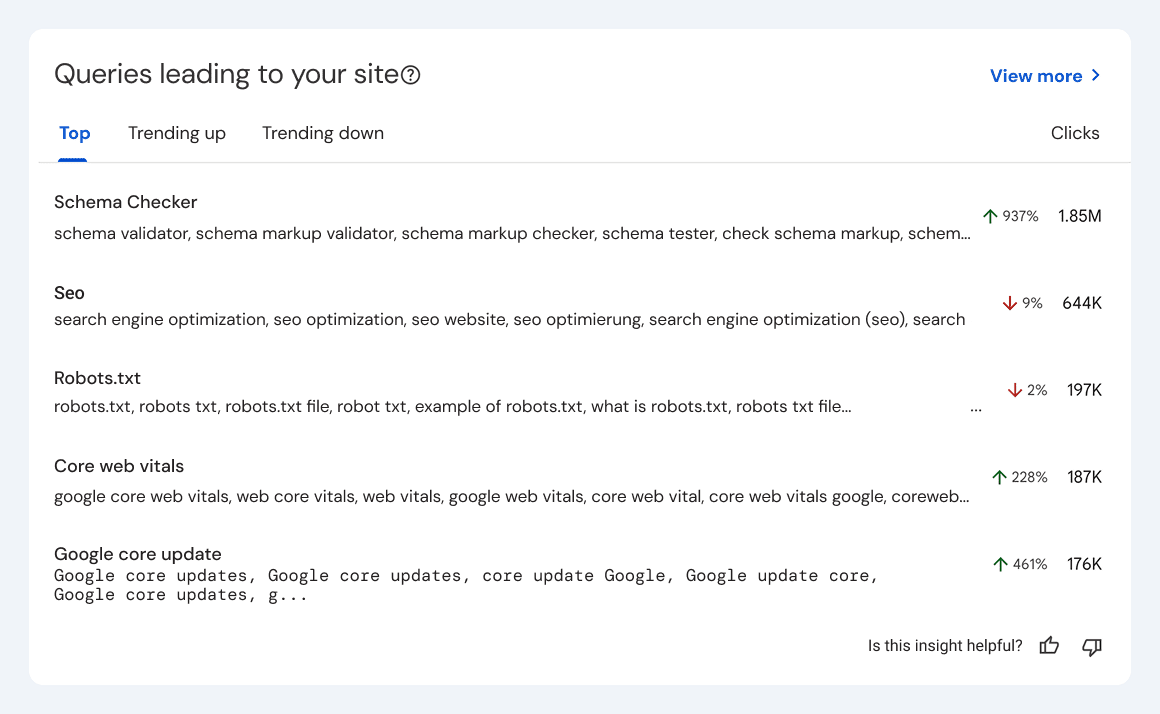 Image source Now that we’ve covered the basics, here’s what those features actually mean for a B2B marketer.




Get new reports and insights from KKBC by email.
 VN
VN 

 VN
VN